Create teams
After registering with centron, you are initially the only member of your default team. As soon as a payment method has been added to your default team, you can create further teams, for example for individual customers or departments.
Prerequisites
- Access to the ccloud³ interface
- A payment method added to your default team
1. Start creating a team
Click your profile icon in the top right-hand corner and select Neues Team erstellen (create new team). Alternatively, go to Kontoeinstellungen (account settings), section Teams, and click Team erstellen (create team).
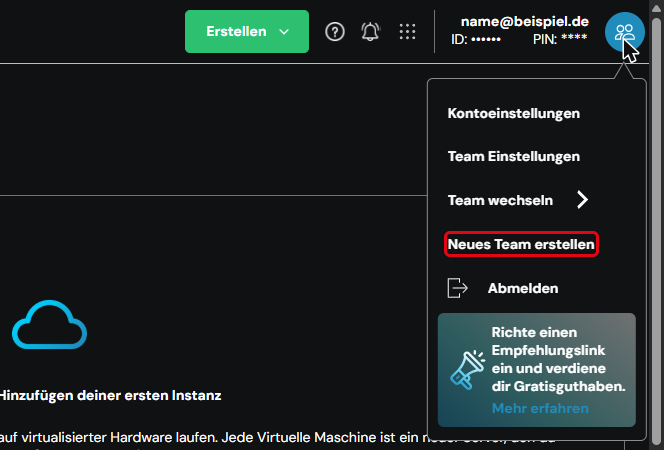
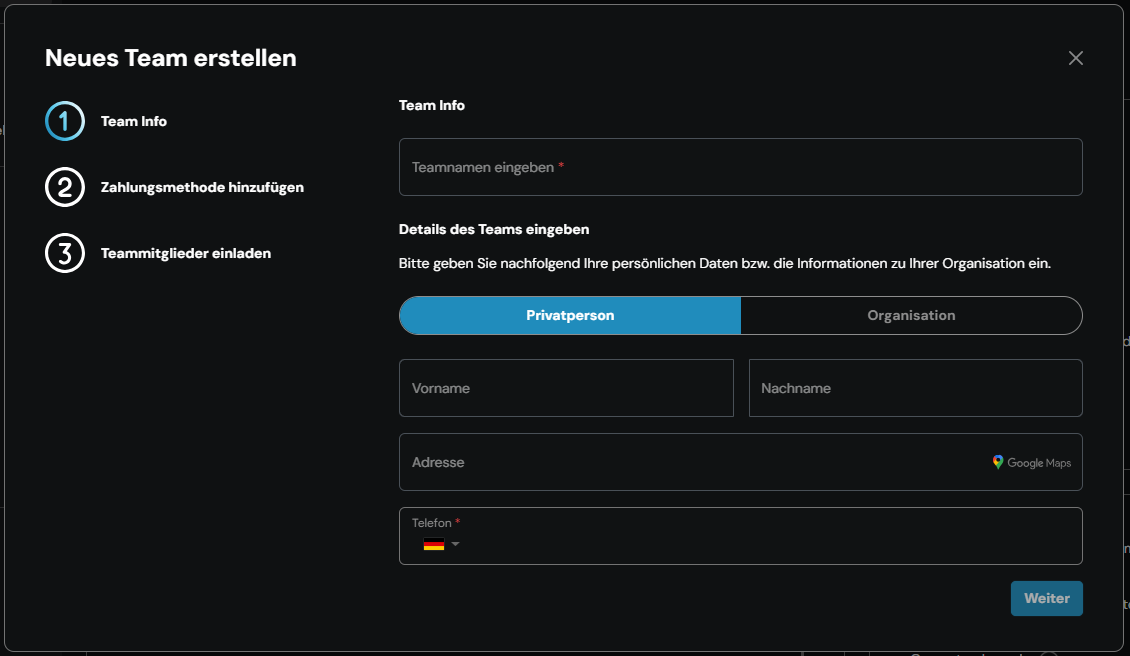
The Neues Team erstellen window opens. Creating a team consists of three steps: Team Info, Zahlungsmethode hinzufügen (add payment method) and Teammitglieder einladen (invite team members).
2. Enter team info
Enter the name of the new team in the Teamnamen eingeben (enter team name) field.
Then use Details des Teams eingeben (enter team details) to specify whether the team belongs to a Privatperson (private individual) or an Organisation (organisation), and fill in the details. For a private individual, these are Vorname (first name), Nachname (last name), Adresse (address) and Telefon (phone).
Click Weiter (next).
3. Add a payment method
Add a payment method for the new team. If a payment method is already assigned to your default team, it is applied automatically and this step is skipped.
4. Invite team members
Optionally, you can enter the email addresses of other people straight away and send the invitations. You can also skip this step and invite members at any time later.
5. Switch between teams
To switch to another team, click your profile icon in the top right-hand corner and select Team wechseln (switch team). A list of your teams with name and team ID appears. Click the team you want. Zurück (back) takes you back to the profile menu.