Team settings at a glance
In the team settings, you manage a team's master data, security and members. Open them via your profile icon in the top right-hand corner and Team Einstellungen (team settings). Which settings a member can view or change depends on their role.
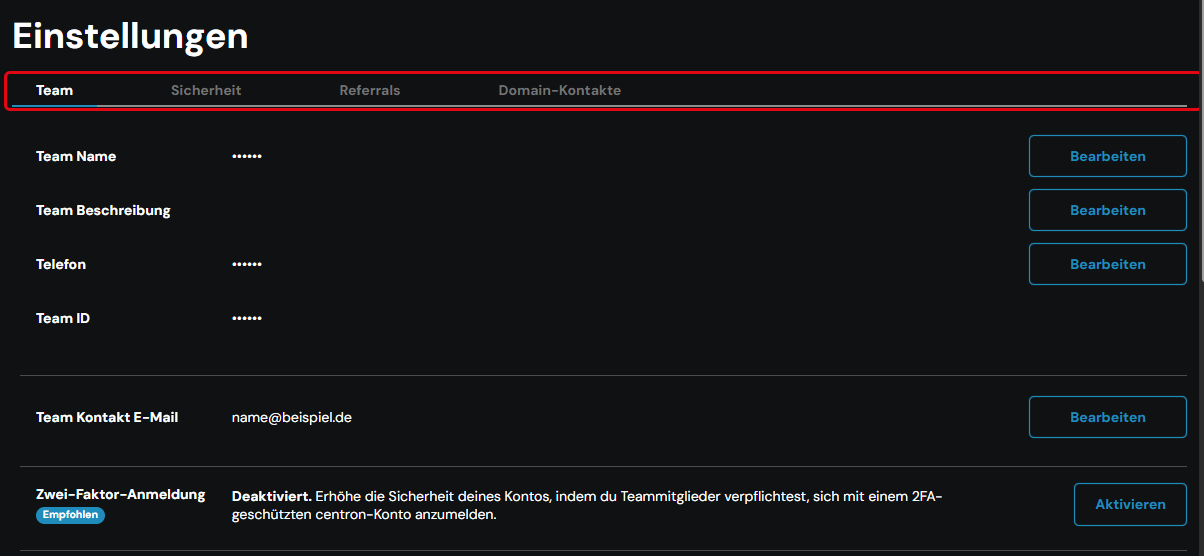
Tabs and settings
The team settings are divided into four tabs:
- Team: master data, two-factor sign-in, limits, members and deleting the team
- Sicherheit (security): SSH keys and personal access tokens for the API
- Referrals: referral link and referral statistics
- Domain-Kontakte (domain contacts): contacts for domain orders
In the Team tab, you will find:
| Setting | Meaning |
|---|---|
| Team Name, Team Beschreibung (description), Telefon (phone) | Master data of the team, editable via Bearbeiten (edit) |
| Team ID | Unique identifier of the team |
| Team Kontakt E-Mail (team contact email) | Central address for operational notifications (see below) |
| Zwei-Faktor-Anmeldung (two-factor sign-in) | Enforces secure sign-in for all members |
| Limits | Current usage and upper limits of resources |
| Team Mitglieder (team members) | Members, roles and invitations |
| Team löschen (delete team) | Permanently deletes the team |
Team contact email
The Team Kontakt E-Mail is the central point of contact for operational notifications and maintenance information. By default, it is the email address of the person who created the team.
The following notifications are sent exclusively to the team contact email:
- Notices about resource events, such as failed deployments or failovers
- Notifications about defined alert policies
- Announcements of emergency migrations or necessary system restarts
- Reminders about renewing SSL certificates
In addition, certain roles receive targeted emails:
- Billing-related messages are sent only to Eigentümer (owners), Abrechner (billers) and Rechnungsbetrachter (billing viewers).
- Notifications about support tickets go to everyone involved in the respective support case.
Two-factor sign-in
The row Zwei-Faktor-Anmeldung shows whether secure sign-in is mandatory for the team, for example with the status Deaktiviert (disabled). To change the setting, see Enforce two-factor sign-in for teams.