Invoices
centron’s billing cycles are monthly. On the first day of each month, your account’s primary payment method will be invoiced and charged for the previous month’s usage.
Invoices list all the costs incurred for an account during a billing cycle. These costs include resource usage, such as the virtual machines you have used, the duration of their use, their size and their cost. If your account does not use any resources, you will not receive an invoice.
When we issue an invoice, we send a PDF file by email to the address specified in the account profile. You can use a different email address to specify a different billing contact.
You can find your most recent invoice in the ‘Invoices’ section of your customer account.
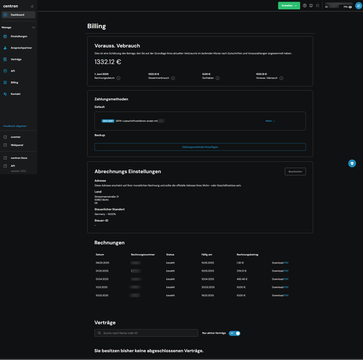
Credit balance
You can make a manual payment via ccenter. Your current account balance is shown at the top of the invoice next to .
Click the ‘Payment’ button to go to the ‘Make a payment’ page. In the ‘Payment amount’ section, you can enter an outstanding balance, the estimated cost for the current billing period, or a custom amount.
This credit will appear on your next bill and will be deducted from your consumption.
Structure of an invoice
The invoices contain reference details such as the invoice number, the due date and the account holder’s name and email address. You can update the account details shown on the invoices on the Profile page. Any changes you make will be visible immediately on the invoices you view afterwards.
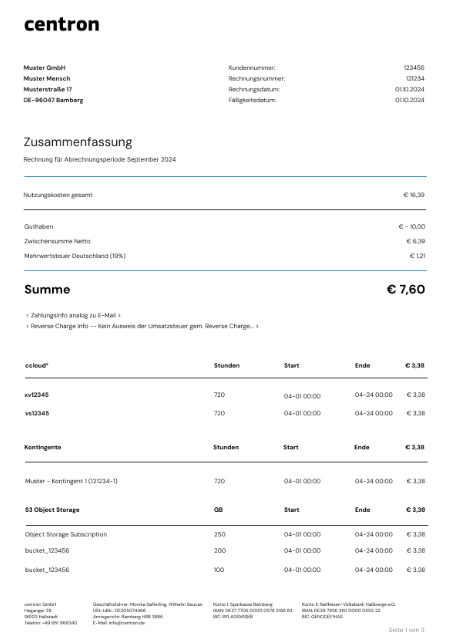
Billing by the hour
Billing is calculated on an hourly basis: for each resource, the amount of resource used per hour is calculated, with any part of an hour counted as a full hour.
Stopped and shelved VMs
The billing period begins when a virtual machine is created and does not end until it is deleted. Even VMs that have been paused, switched off or shelved will continue to be charged, as the allocated resources remain reserved. Charges will only cease once you have permanently deleted the instance.